
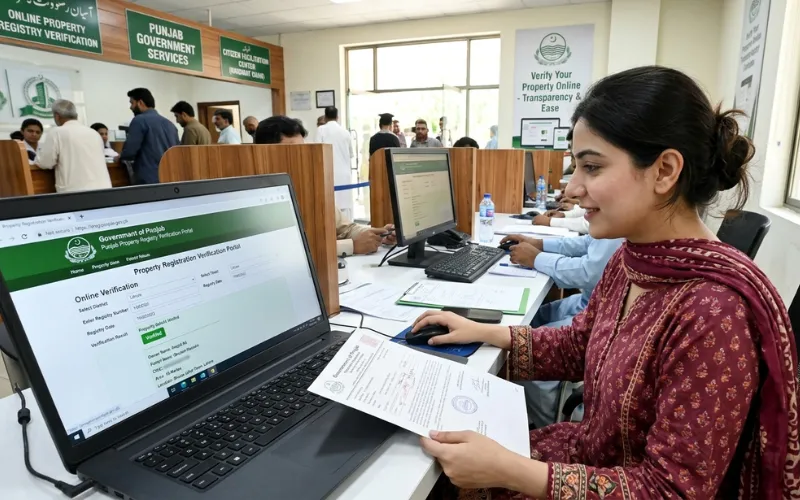

To verify a property registry online in Punjab, go to rod.pulse.gop.pk or open the Property Registration section on punjab-zameen.gov.pk, select the district and service center, choose your search method from CNIC, Bahi number, registration number, or owner name, enter the relevant details, and click Search. The portal retrieves the matching registry records from the PLRA database, displays ownership and registration details, and allows you to view or download the scanned deed as a PDF. This service is free of charge for basic verification.
Property fraud in Punjab has historically been enabled by the gap between what a seller claims and what the official record shows. Closing that gap used to require physically visiting Sub-Registrar offices, waiting for manual file searches, and relying on whatever a middleman reported back. The ROD portal eliminated all of that. Today, anyone with a CNIC and internet access can confirm in minutes whether a property has been legally registered, who the registered owner is, and whether the deed shown to them matches the official scanned record in the government’s database.
What the ROD Portal Is and Who Operates It
The ROD portal, which stands for Record of Deeds, is an official digital platform maintained by the Punjab Land Records Authority under the administrative control of the Board of Revenue Punjab. Its primary purpose is to provide public access to digitized property registry records, scanned sale deeds, mutation records, and related documentation for all registered properties in Punjab.
The portal operates at two URLs. The primary access point is rod.pulse.gop.pk, and the PLRA portal at punjab-zameen.gov.pk also links directly to the Property Registration section which redirects to rodportal.punjab-zameen.gov.pk. Both lead to the same official database. Always verify that you are on one of these official government domains before entering any CNIC or personal information. Any website that resembles these portals but uses a different domain is not official and should not be used.
The database is updated daily as new registries and mutations are approved by local revenue offices. This means a registry completed yesterday at a Sub-Registrar office will appear on the portal within 24 hours of the data being transmitted and confirmed.
What You Can Verify Through the Portal
The ROD portal gives access to several categories of records beyond just confirming whether a deed exists. Understanding what each record type shows helps you use the portal more effectively before a property transaction.
The most commonly requested verification is the sale deed itself, which is the registered document confirming transfer of property from seller to buyer. When you search and find a matching record, the portal displays the registration details and allows you to view the scanned copy of the actual deed registered at the Sub-Registrar. This scanned copy can be downloaded as a PDF and is an official document acceptable for legal purposes.
Beyond the deed, the portal also shows mutation records linked to the property, which confirm whether ownership was formally updated in the revenue record after a sale or transfer. It displays the year of registration, registry number, mauza, and associated owner details. For properties involved in inheritance or succession, the mutation records visible through the portal reveal how the ownership chain developed over time.

The Four Search Methods Available on the Portal
The ROD portal offers multiple search pathways to accommodate different situations. Not every user will have all pieces of information, so the system allows you to search using whichever identifier you have available.
The first and most direct method is searching by CNIC. You enter the seller’s or owner’s 13-digit CNIC without dashes, select the district and tehsil, and the system retrieves all properties registered against that CNIC in the selected jurisdiction. This is particularly useful for buyers verifying that the person claiming to sell them a property is the registered owner.
The second method is searching by registration number, which is the unique number assigned to each deed at the time of registration at the Sub-Registrar office. If the seller has provided you with their registry number, this is the fastest way to pull up the exact record.
The third method is searching by Bahi number. The Bahi is the physical register maintained at each Sub-Registrar office in which deeds are recorded sequentially. If you know the Bahi number and year of registration, you can locate the deed through this reference.
The fourth method is searching by owner name. Name-based searches work with some limitations because common names may return multiple results. Using the name search alongside district and tehsil filtering improves accuracy, but CNIC-based searches are always more reliable for confirming a specific individual’s ownership.
Step-by-Step Verification Process on the ROD Portal
The process is straightforward but accuracy at each step matters because a single wrong digit in a CNIC or an incorrect district selection will return no results and may create confusion about whether a record exists.
Start by opening your browser and navigating to rod.pulse.gop.pk. The portal is available in both Urdu and English and you can toggle between languages using the button at the top of the homepage.
On the homepage, locate the Property Registration section. You will first be prompted to select the district where the property is located, followed by the service center, which corresponds to the tehsil-level Sub-Registrar office that registered the deed. Selecting the correct district and service center is essential because deed records are organized by the office that registered them, not by where the property is physically located.
After selecting the location, choose your search type from the dropdown menu. The options are CNIC, Bahi number, registration number, and owner name. Select the method for which you have the most reliable information.
Enter the search value exactly as required. For CNIC, enter all 13 digits without hyphens or spaces. For a registration number, enter it exactly as shown on the deed or receipt. The system validates the format automatically and will prompt you if the entry is incorrect.
Click Search. The portal displays a list of matching entries showing the year of registration, registry number, mauza, and basic ownership details. Review the results to identify the correct property record, then click on the relevant entry. The full record appears including the scanned deed, which you can view in the browser or download as a PDF.
If the downloaded PDF opens as a password-protected file, your 13-digit CNIC number serves as the password to open the document.
What Overseas Pakistanis Should Know About Using the Portal
The ROD portal is accessible internationally and is specifically designed to serve overseas Pakistanis who need to manage or verify their property records remotely. The portal detects international access and adjusts settings where necessary. For overseas users who do not have a local Pakistani SIM for OTP verification, the system offers an email OTP option. You must have a registered email address linked to your PLRA account to use this route.
Overseas Pakistanis can also use their NICOP number instead of a domestic CNIC when searching property records through the portal. This is particularly useful for citizens who hold a National Identity Card for Overseas Pakistanis rather than a standard CNIC. The property search results and downloadable records are identical regardless of whether the search was initiated from inside or outside Pakistan.
For those managing property investment from abroad, verifying the registry online before authorizing any Power of Attorney or payment is a critical safeguard. The portal allows you to confirm the current registered owner, see the history of mutations, and download the scanned deed without relying on a local intermediary to report back to you.
How to Verify an e-Stamp Paper’s Authenticity Alongside the Registry
A complete property verification before purchase involves more than just confirming the deed exists in the ROD portal. The e-stamp paper used in the registration of that deed should also be independently verified. Every e-stamp paper issued through the Bank of Punjab carries a 16-digit number. Entering this number into the official e-stamp verification portal confirms whether the stamp paper is genuine and matches the registered deed.
This two-step verification, confirming the deed in the ROD portal and confirming the e-stamp paper independently, gives buyers a complete picture of whether a registration was completed legitimately. A deed that appears in the ROD portal but whose stamp paper cannot be verified is a significant warning sign that requires investigation before any transaction proceeds.
Checking That the Registry Has Been Followed by a Mutation
A common mistake buyers make is stopping at registry verification without checking whether the mutation was also completed. In Punjab’s land records system, the registry confirms the deed is registered but the Fard and the official ownership record only update after the mutation is attested in the PLRA system.
Through the ROD portal, you can view the mutation record associated with a registered deed. If a registry was completed but the mutation was not attested, the Fard will still show the previous owner’s name in the PLRA database even though the deed exists. Under the e-registration system, mutation after a registered deed now occurs automatically without requiring a separate visit to the Arazi Record Centre. But for older registries completed before the e-registration system was fully operational, the mutation may need to be verified separately through the PLRA portal’s Fard service.
For a property being bought today, the buyer should confirm through the Punjab Zameen portal that the Fard reflects the seller’s name as the current owner before completing the transaction, and then re-verify after the new registry and mutation are processed to confirm the updated Fard shows the buyer’s name.
What to Do When No Registry Record Appears
If you search the ROD portal and no record appears for a property that the seller claims has been registered, there are several explanations worth investigating before concluding there is fraud.
The most common reason is that the record exists but in a different district or tehsil than the one you selected. Property in Punjab is indexed under the Sub-Registrar office that registered it, which is typically the one covering the area where the property is located but may not always match your expectation. Try adjusting the service center selection and searching again.
A second possibility is that the record has not yet been digitized. PLRA reports that the large majority of Punjab’s land records are digitized, but very old transactions, particularly those from before the Land Record Management and Information System project began in 2007, may still exist only in scanned paper form or may not have been uploaded to the public-facing portal yet.
For records that genuinely do not appear online, the appropriate step is to visit the Sub-Registrar office where the deed was registered and request a certified copy of the registry from their physical records. A seller who cannot produce either an online ROD portal record or a certified copy from the Sub-Registrar office for a claim of registered ownership is presenting a serious verification problem that should stop any transaction from proceeding.
Why Verification Matters Before Every Property Transaction
The practical argument for using the ROD portal before any purchase, sale, or mortgage is not complicated. Property fraud in Punjab has historically relied on one of three conditions: a buyer who does not verify independently, a buyer who relies on the seller’s own documents without checking the official record, or a buyer who verifies through informal channels rather than the government portal.
The ROD portal removes all three vulnerabilities. A fraudulent seller who has not legally registered the property they are claiming to sell, or who has already sold it to someone else, or who is using forged documents, will be exposed the moment the buyer enters the CNIC or registration number into the official portal. A property that shows up in the ROD portal with the correct ownership details, a matching e-stamp paper, and an updated Fard in the PLRA database is the baseline minimum verification before any significant amount of money changes hands.
The steps to buy land in Pakistan now necessarily include online verification as a standard stage, not an optional one. Given that the portal is free for basic verification and accessible from any device with internet, there is no logistical or financial reason to skip it.

Frequently Asked Questions
What is the official portal for verifying a property registry in Punjab?
The official portal is rod.pulse.gop.pk, operated by the Punjab Land Records Authority under the Board of Revenue Punjab. The PLRA main portal at punjab-zameen.gov.pk also links to the Property Registration section which connects to the same database. Always use these official government URLs and avoid third-party websites claiming to provide registry verification services.
What information do I need to verify a property registry online?
You need the district and tehsil where the property is registered, and at least one of the following: the owner’s 13-digit CNIC number, the deed’s registration number, the Bahi number and year of registration, or the owner’s name. CNIC-based searches are the most reliable for confirming a specific person’s registered ownership.
Is there a fee for verifying a property registry on the ROD portal?
Basic verification and viewing of registry records on the ROD portal is free of charge. Downloading a certified PDF copy of a deed may carry a nominal charge depending on the service tier. No payment to any individual or agent is required or legitimate for this service.
Can I verify a registry from outside Pakistan?
Yes. The ROD portal is accessible internationally. Overseas Pakistanis can search using their CNIC or NICOP number. For OTP verification, an email OTP option is available for users without a local Pakistani mobile number. All records visible on the portal are accessible from any country with the same results as a domestic search.
What should I do if the registry does not appear on the portal?
First try adjusting your district and service center selection, as the record is indexed under the Sub-Registrar office that registered it. If it still does not appear, the record may not yet be digitized. In that case, visit the relevant Sub-Registrar office in person and request a certified copy of the registry from their physical records. A seller who cannot produce either an online record or a certified physical copy has a serious ownership verification problem.
Is it enough to verify the registry, or should I check the Fard too?
Both verifications are necessary. The registry confirms the deed was registered at the Sub-Registrar. The Fard from the PLRA portal confirms that the mutation was also completed and that the land record reflects the correct current owner. A deed without a corresponding mutation means the Fard may still show the previous owner’s name. Always cross-check the ROD portal registry record against the current Fard from the PLRA database before completing any property transaction.