
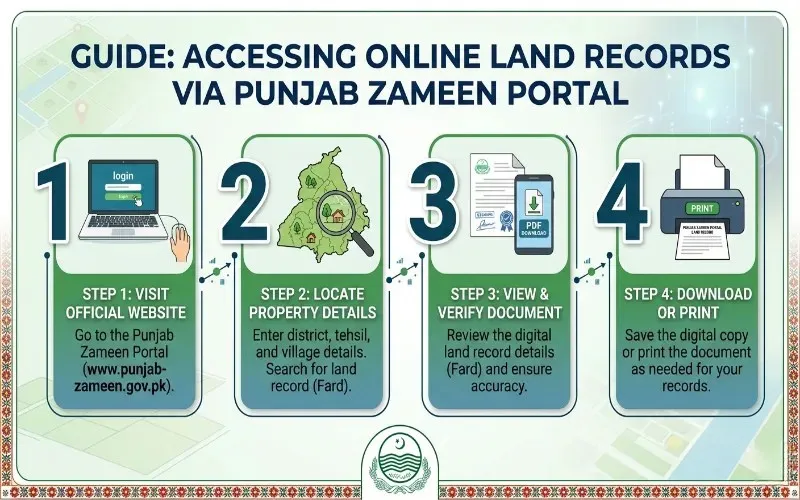

To get a Fard online from the Punjab Zameen portal, visit punjab-zameen.gov.pk, register or log in using your CNIC and mobile number, select the Fard Online service, enter your property details including district, tehsil, mauza, and khewat or khasra number, pay the applicable fee online, and download your digital Card as a PDF. The same service is also available through the Punjab Zameen mobile app managed by the Punjab Land Records Authority.
Before digital services existed, getting a Fard meant visiting the Patwari office, dealing with middlemen, and waiting through a process that could take days or longer. The Punjab Land Records Authority transformed this entirely. Today, a property owner in any of Punjab’s 36 districts can get a verified, QR-coded Card from their phone or laptop without stepping into any government office. Understanding exactly how the online process works, what information you need beforehand, and what the different types of Fard mean is what this guide is for.
What a Fard Actually Is and Why It Matters
A Fard is the official document issued by the Punjab Land Records Authority that confirms who owns a piece of land, its exact area, location, and the complete record of its ownership history. It is drawn from the computerized land records maintained by PLRA under the Land Record Management and Information System, which stores data for all registered properties across Punjab.
The Fard is not a minor administrative certificate. It is the document that courts, banks, revenue authorities, and buyers rely on as the primary proof of land ownership in Punjab. If you are filing a complaint before the Punjab Property Tribunal, buying or selling property, applying for a bank loan against land, completing an inheritance mutation, or verifying someone else’s ownership before a purchase, the Fard is what the system demands first.
Every Card issued today carries a printed QR code, allowing anyone to independently scan and verify the document’s authenticity against the PLRA database. This QR feature makes forgery far more difficult than it was under the old paper-based system.

The Two Types of Card You Need to Know
Not all Cards serve the same purpose, and selecting the wrong type for your situation will cause delays. PLRA issues two distinct categories.
An Information Card is used purely for verification purposes. It confirms ownership, area, location, and any encumbrances or mutations recorded against the property. This is the type you would get when checking whether a seller actually owns the land you intend to buy, confirming your own ownership status, or submitting ownership proof in legal proceedings that do not involve a transfer.
A Sale Card is specifically required when a property transaction involving a transfer of title is being processed. If you are going through a property registry or sale deed process, the registry office and the Sub-Registrar will require a Sale Card rather than an Information Fard. The Sale Fard confirms that the property is free of encumbrances at the time of transfer and that the seller has legal authority to complete it.
The fee structure differs between the two types, and the system will ask you to specify which type you need at the time of your online request.
What You Need Before You Start
Attempting to get a Fard online without the right information in front of you will result in failed searches and frustration. Gather the following before opening the portal.
Your CNIC is mandatory. The portal uses your 13-digit CNIC as the primary identity verification tool, and it is what links the system to any property registered in your name. You also need your active mobile number, because an OTP will be sent during the registration or login process.
For the property search itself, you need at least one of the following reference points:
- District and tehsil where the property is located
- Mauza (village or locality) name
- Khewat number, which is the account number for a group of co-owners in a land record
- Khasra number, which is the field number identifying a specific plot within a mauza
- Registry number, if the property has been formally registered
If you do not know your Khewat or Khasra number, check your most recent Fard, your property registry document, or any previous mutation record. These numbers appear on every official land record document. Getting them right before you start will save you from failed search results.
Step-by-Step Process for Getting the Online Fard
The process through the Punjab Zameen portal follows a clear sequence. Each step builds on the previous one, and there is no way to skip ahead.
Step One: Visit the Official Portal and Register
Open your browser and go to punjab-zameen.gov.pk. This is the official PLRA portal. Do not use third-party websites that claim to offer Fard services, as these are not connected to the official PLRA database and cannot issue a legally valid document.
If you are a first-time user, select the option to register a new account. You will be asked to enter your CNIC, mobile number, and email address. An OTP will be sent to your registered mobile number. Enter it to verify your identity and complete registration. Existing users can log in directly using their CNIC or username and password.
Step Two: Select the Fard Online Service
Once inside your account dashboard, locate the Card Online tab or the Get Card option. The portal groups PLRA services by category, and the Fard service is prominently listed. Select the appropriate type of Fard you need, Information Fard or Sale Fard, before proceeding to the search.
Step Three: Enter Your Property Details
The system will present a search form asking for the following:
- District where the property is located
- Tehsil within that district
- Mauza name
- Khewat number or Khasra number, or both if available
- Registry number as an alternative search option
Enter these details carefully. A single digit wrong in a Khewat number, or a misspelling of the Mauza name, will return no results or pull up a different property entirely. Double-check each entry against your paper documents before submitting.
Step Four: Verify Ownership Information
Once you submit the search, the system retrieves the matching record from the PLRA database. You will see the ownership information, property dimensions, recorded mutations, and any encumbrances or court orders attached to the record. Review this information to confirm you are looking at the correct property before proceeding.
Step Five: Pay the Fee
The PLRA charges a fee for Fard issuance. Based on PLRA’s published rate structure, the standard fee is Rs50 per Khatoni entry, with a maximum of Rs150 per Khewat, plus applicable PLRA service charges. Sale Fard fees may differ from Information Fard fees, and the system will display the exact amount before you confirm payment.
Payment is made online through the available payment options on the portal, which include banking app transfers and debit or credit card payments. Save the payment confirmation and transaction reference number before proceeding to the next step.
Step Six: Download Your Digital Fard
Once payment is verified, the portal generates your Fard as a downloadable PDF. Download and save this file immediately. The digital Fard carries the QR code that verifies its authenticity. For legal, banking, or court purposes, this digital document is valid and carries the same standing as a Fard printed at an Arazi Record Centre.
If the download does not complete or the PDF is corrupt, do not pay again. Contact PLRA through their helpline at 042-111-222-277 or through the complaint option in the portal to resolve the issue.
Getting the Fard Through the Punjab Zameen Mobile App
The Punjab Zameen mobile app, managed by PLRA, offers the same Fard service through a smartphone interface. The app is available on the Google Play Store and is the official mobile platform for land record services in Punjab.
The process within the app mirrors the portal. Log in with your CNIC and mobile number, select the Fard service, enter your property details, pay the fee, and download your Fard. The app is particularly useful for people who prefer managing their land records from a mobile device rather than a computer.
Future versions of the app are also expected to include the ability to book appointments at Arazi Record Centres and initiate land transfers directly, expanding its utility beyond the current Fard and record-checking functions.
The Physical Alternative at Arazi Record Centres
If you encounter technical difficulties with the online portal or prefer an in-person service, the Arazi Record Centres established by PLRA in every district of Punjab provide the same Fard through a walk-in process.
To use an ARC, call the PLRA helpline at 042-111-222-277 to book an appointment first. Arrive at the centre with your CNIC and property reference details. The service centre staff will search the PLRA database by your name, father or husband’s name, or Khewat number. Your photograph and biometric thumb impression will be captured through a biometric device. A challan is issued for the fee, which is deposited at the bank counter within the centre. The Fard is then printed and handed to you. On average, the process at an ARC takes less than 30 minutes.
For those who cannot travel to an ARC, PLRA also operates Mobile Arazi Record Centres in several districts. These mobile units visit different areas on a scheduled basis, typically on Wednesdays and Thursdays, in districts including Lahore, Multan, Faisalabad, Rawalpindi, Gujranwala, Sargodha, and Bahawalpur. The same Fard service is available at these mobile centres as at the permanent ARCs.
Can Someone Else Get a Fard on Your Behalf
The PLRA does allow a representative to obtain a Fard if the owner is unavailable. The representative must have an attested copy of a Power of Attorney, specifically a Mukhtarnama Aam, that has been verified by the concerned Sub-Registrar. The ARC will confirm the validity of the Power of Attorney before issuing the Fard.
This provision is particularly important for overseas Pakistanis who need their land records managed in their absence. With a properly verified Power of Attorney, a trusted family member or legal representative can obtain Fards and other land record documents on the owner’s behalf.
Common Issues and How to Handle Them
The most frequently reported problems with the online Fard process fall into a few predictable categories.
If the search returns no results, the most likely cause is an incorrect Khewat number, Khasra number, or Mauza name. Even a slight variation in the spelling of a Mauza name can cause the system to find nothing. Cross-check your reference numbers against your physical documents and try the search again.
If the owner name in the system does not match your CNIC, contact PLRA support through the portal or helpline. This kind of mismatch often indicates an old record that predates the computerization, or an error in data entry during digitization. The correction process requires visiting an ARC and submitting an application for a Fard Badar correction, which rectifies clerical errors in the record.
If the PDF downloads as a corrupted file after payment, do not attempt a second payment. File a complaint through the PLRA portal’s complaint feature and contact the helpline. The system will regenerate the Fard without requiring a repeat payment once the issue is confirmed.
If the property record reflects an incorrect mutation or encumbrance that should not be there, that is a separate matter requiring formal correction at the ARC level. The online portal does not allow changes to the underlying record. It only retrieves and displays what is in the system.
Why Getting a Current Fard Matters for Every Property Transaction
Under the Punjab Land Revenue (Amendment) Ordinance and the POIP framework, a clean, current Fard is the foundation of every property-related legal proceeding. The Scrutiny Committee that investigates property complaints verifies ownership through the PLRA database. If your Fard reflects outdated information, a pending mutation, or an unresolved discrepancy, it will complicate your case regardless of how legitimate your claim is.
Anyone involved in buying property should request a Fard dated within the last seven days, because an older Fard may not reflect recent mutations or encumbrances attached to the property. Verifying the khewat and khasra numbers shown on the Fard against the physical property you are dealing with is equally important, as errors in field-level identification can lead to transactions involving the wrong land.
The shift to digital Fards with QR verification has made independent authenticity checking straightforward. Before accepting any Fard in a property transaction, scan the QR code to confirm that the document matches the live PLRA record. A mismatch between what the Fard shows and what the QR code returns is a serious warning sign that should stop any transaction immediately.

Frequently Asked Questions
What is the official website for getting a Fard in Punjab?
The official portal is punjab-zameen.gov.pk, operated by the Punjab Land Records Authority. The same service is also available through the Punjab Zameen mobile app available on the Google Play Store. Always use the official portal or app, as third-party websites cannot issue legally valid Fards from the PLRA database.
What information do I need to get a Fard online?
You need your 13-digit CNIC, active mobile number for OTP verification, and at least one property reference such as the district, tehsil, mauza name, khewat number, khasra number, or registry number. Having your khewat and khasra numbers ready before starting will give you the fastest search results.
What is the fee for getting a Fard from the Punjab Zameen portal?
The standard PLRA fee is Rs50 per Khatoni entry and a maximum of Rs150 per Khewat, plus applicable PLRA service charges. Sale Fard fees may differ from Information Fard fees. The exact amount is displayed by the portal before you confirm payment.
What is the difference between an Information Fard and a Sale Fard?
An Information Fard is used for verification purposes only, such as confirming ownership, checking land records before purchase, or submitting ownership proof in legal proceedings that do not involve a transfer. A Sale Fard is specifically required when a property transfer or registration is being completed, as it confirms the property is clear of encumbrances at the time of the transaction.
Can I get a Fard on behalf of someone else?
Yes, but only with a Power of Attorney that has been verified by the Sub-Registrar. The representative must present an attested copy of the Mukhtarnama Aam at an Arazi Record Centre. This provision allows overseas Pakistanis and absentee owners to have trusted representatives manage their land records.
What should I do if the downloaded Fard PDF is corrupted?
Do not make another payment. File a complaint through the complaint feature on the PLRA portal and contact the helpline at 042-111-222-277. The system will regenerate the Fard once the technical issue is confirmed, without requiring a second payment.